
Operations at a glance,
inside your boundary.
A CLI-focused operations platform with a calm, auditable CLI and a self-hosted Management Console. No telemetry. No vendor lock-in.
- Ubuntu / systemd
- REST API gateway
- RBAC + PAT tokens
- DB circuit breaker
A CLI for the host. A Console for the org.
The CLI runs on every Linux/systemd host and handles discovery, registration and configuration safety. The Console runs inside your boundary and gives operations teams dashboards, RBAC and resilience.
AtGlance CLI
A focused agent for systemd hosts: service discovery, health, configuration backup and import, registration, deregistration and reactivation.
Explore the CLIManagement Console
Self-hosted console with REST API gateway, database and cache. Dashboards, RBAC, configuration history, queue resilience and a database circuit breaker.
Explore the ConsoleCalm operations. Strict boundaries.
Self-hosted by design
Deploy the entire Console inside your VPC, on-prem or hybrid. No data leaves your perimeter.
Native systemd discovery
The CLI reads journalctl and ss/netstat on Ubuntu hosts to discover services and their ports. No extra daemons.
Configuration safety
Every config change writes a versioned backup. Import and validate before applying. Rollback is a single flag.
RBAC + PAT tokens
Three roles (superadmin, admin, user) and short-lived Personal Access Tokens for the CLI. Every action is auditable.
DB circuit breaker
When the database is unhealthy, writes are buffered as queued jobs and replayed idempotently when it recovers.
One REST API
A single REST surface for registration, configuration files and token validation, fronted by a rate-limited gateway.
Database outage? Your writes don't disappear.
What happens behind the curtain when the database goes down.
-
STEP 01DB outage detectedThe circuit breaker trips. Reads fall back to cache where safe.
-
STEP 02Writes are queuedMutations are encoded as jobs and buffered in the cache. Clients get fast acks.
-
STEP 03DB recoversHealth checks pass; the circuit closes. Workers pick up where they left off.
-
STEP 04Jobs replayQueue workers apply buffered writes idempotently. State converges. Audit logs restored.
A boring, predictable stack.
A REST gateway fronts the Console, backed by a database and a cache. The CLI talks to the gateway over HTTPS. That's it.
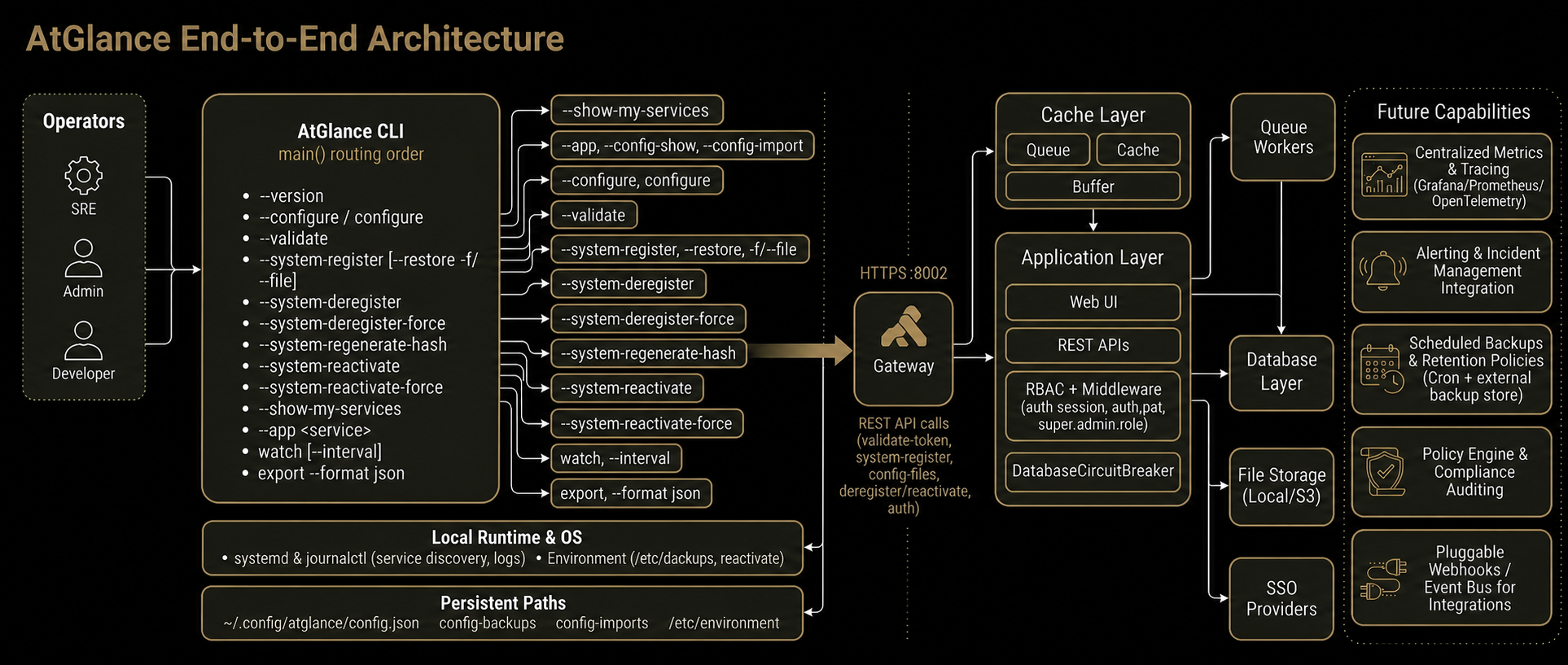
One curl. systemd-friendly. Idempotent.
The installer sets up the CLI package. The CLI writes its config to ~/.config/atglance and registers your host with the Console.
$ curl -fsSL https://app.atglance.live/cli/atglance-installer.sh | sudo bash→ Detected: Ubuntu 22.04 · systemd 249→ Installed atglance → /usr/local/bin/atglance$ atglance --configure✓ Wrote ~/.config/atglance/config.json$ atglance --system-register✓ Registered system_id=sys_8e1a in org=acme